
Verifiable attendance documentation for courts and supervising agencies
Auditend helps participants create tamper-evident meeting attendance records they can share with courts, probation officers, and other supervising agencies. Each record combines a timestamp, an approximate-area observation, and selfie evidence. Auditend documents what was recorded; the supervising authority decides whether it satisfies a requirement.
Who this page is for
- •Judges reviewing compliance documentation
- •Court clerks processing attendance reports
- •Attorneys (prosecution and defense) evaluating attendance records
- •Probation and parole officers monitoring compliance
- •Treatment providers requiring documented attendance
How participant attendance documentation works
- 1
The participant records arrival
At check-in, Auditend records the time, an approximate area, and selfie evidence. It does not continuously track the participant.
- 2
Auditend protects record integrity
The attendance evidence becomes part of a tamper-evident record designed to reveal later alteration.
- 3
The participant creates a report
The participant chooses the records and recipient, then generates a report with a unique verification code.
- 4
The reviewer verifies authenticity
An identified reviewer can use the verification code to confirm that Auditend generated the report and that its issued contents have not been altered.
Paper sign-in sheets vs. verified digital records
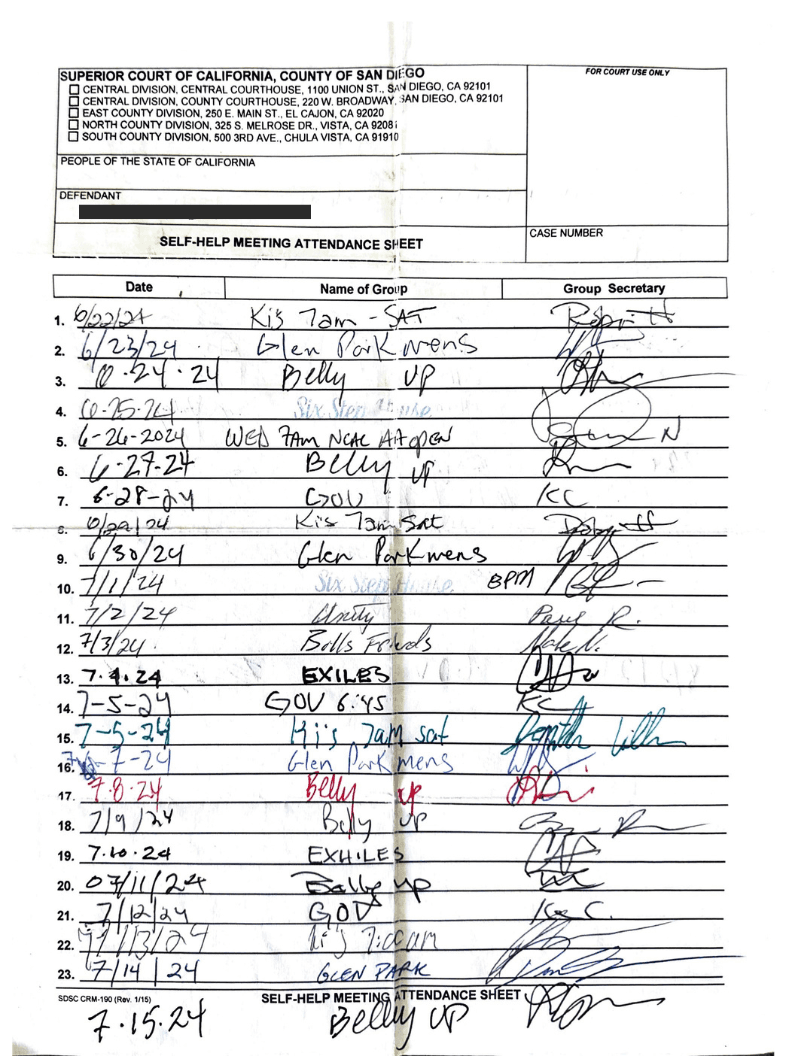
Paper sign-in sheets
- Easily forged or fabricated
- No way to verify authenticity
- Requires meeting involvement
- Easy to lose
- Easy to forget
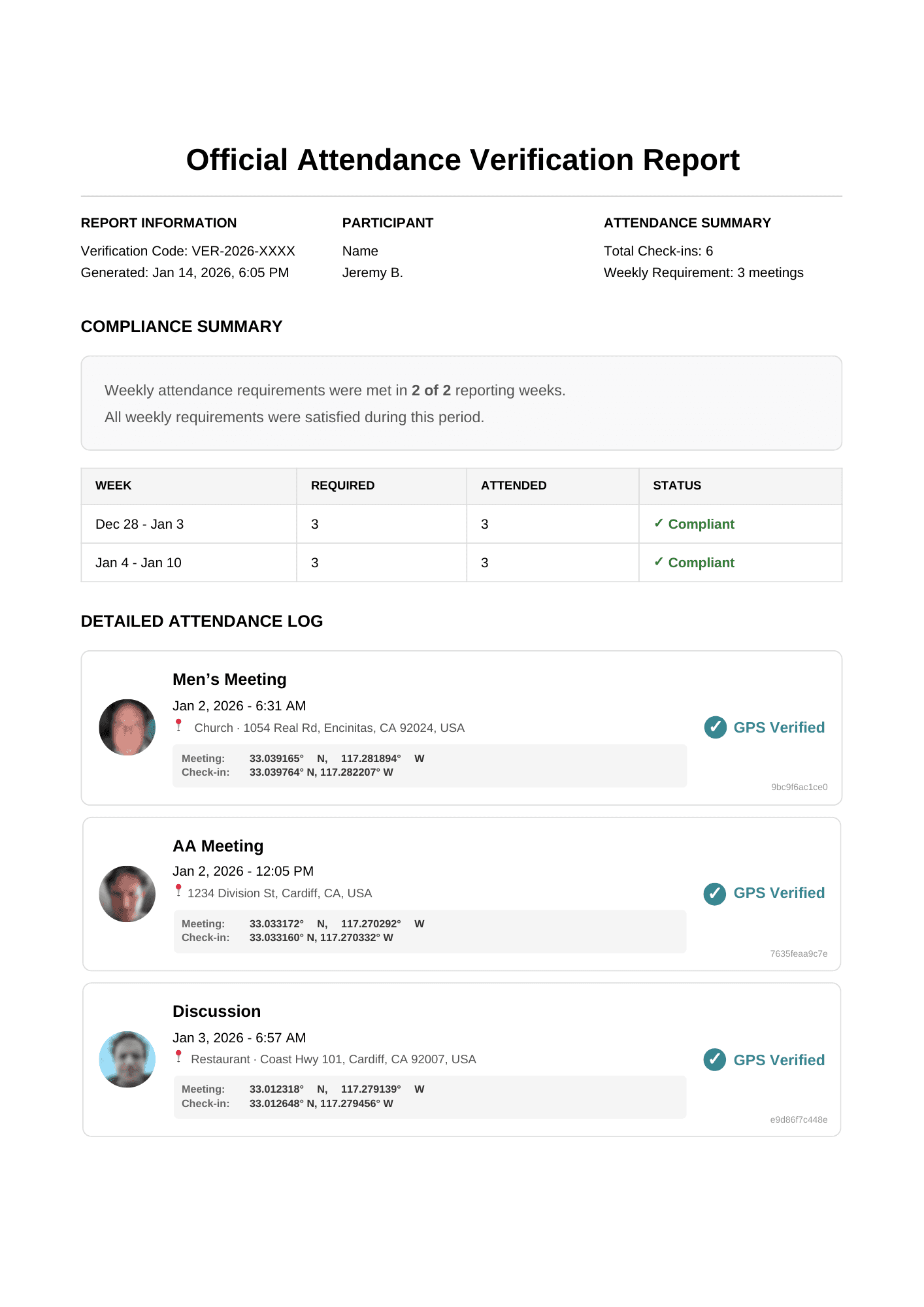
Auditend verified reports
- Approximate location + selfie evidence
- Independently verifiable online
- No meeting involvement needed
- Always on your phone
- Reminds you to check in
What attendance reports contain
Each Auditend attendance report includes:
Participant identification
Name as registered in the system
Timestamped check-in records
Meeting name, scheduled time, check-in time, timing relative to the schedule, and follow-up status when recorded
Approximate area
Approximate check-in area and listed meeting venue, with maps and general-area review flags where applicable; no exact check-in coordinates
Selfie evidence on file
The PDF indicates that selfie evidence is on file; it does not embed the selfie. Evidence details require a named, logged access link.
Unique verification code
Code for independent verification of report authenticity
Evidence summary and review flags
Reports summarize arrival-plus-follow-up records, arrival-only records, integrity exceptions, and records requiring review. Flags can identify missing follow-up, package integrity issues, schedule timing, or general-area inconsistencies. These flags support review; they are not a compliance determination. An attendance-by-week table depends on the selected goal overlapping the report period.
What each check-in records
Each check-in binds together three pieces of tamper-evident evidence. Auditend records this evidence — it does not decide whether a participant “attended”; the reviewer evaluates the record.
Approximate area
A coarse location (about a city block) — no exact coordinates, no distance to the venue, no geofence
Timing
1 hour before to 1 hour after start
Selfie evidence
A short video selfie recorded at check-in and retained on file, with access logged
“Still Here” mid-meeting confirmation
Approximately 45 minutes after check-in, participants receive a notification for an optional second observation. It simply records whether they are still in the same general area as their own earlier check-in — it is never compared to the venue, and no distance is computed. This is optional — if the participant does not respond, the original check-in still counts. Reports indicate which check-ins include this additional confirmation.
How to verify a report
- 1
Locate the verification code
Found in the header or footer of the attendance report (format: VER-YYYY-XXXXXX)
- 2
Visit the verification page
Go to verify.auditend.com
- 3
Enter the code
Check the issued report’s integrity. Report details, including selfie evidence, require a named, logged access link.
What “tamper-evident” means
The issued report includes a report hash and signature. Verification checks the stored PDF fingerprint and report signature to establish the integrity of that issued document.
A verification code identifies the issued report. Detailed evidence access is separate and requires a named, logged access link. Report integrity does not independently establish attendance or compliance.
What Auditend does not do
Does not monitor meetings
We have no presence at meetings and no knowledge of what happens there.
Does not track location continuously
An approximate-area observation is recorded at check-in and during an optional follow-up. There is no continuous location tracking.
Does not verify meeting duration
Reports document device-submitted check-in and follow-up evidence. They do not independently establish attendance or how long a participant stayed.
Not affiliated with any fellowship
Auditend is an independent technology company. We have no affiliation with AA, NA, CA, or any recovery organization.
Questions about Auditend records
Does Auditend continuously track participants?
No. Auditend records an approximate-area observation during check-in and, when completed, an optional follow-up observation. It does not continuously monitor location or use background location tracking.
What does report verification confirm?
Verification confirms that Auditend generated the issued report and that its contents have not been altered. It does not independently determine attendance, legal compliance, or program completion.
Do courts automatically accept Auditend reports?
No. Each court, probation officer, or supervising organization decides what documentation it will accept. Participants should confirm requirements with their supervising authority.
Questions for courts
If you have questions about Auditend reports or verification, we are available to assist.
courts@auditend.comAuditend is designed to support court and probation documentation. Based in Southern California.